


| Supported Operating System | v8.9.0 | v8.9.1 | v8.9.2 | v8.10.0 | v8.10.1 | v8.10.2 | ||||||||||||||
|---|---|---|---|---|---|---|---|---|---|---|---|---|---|---|---|---|---|---|---|---|
| Note: For all versions Microsoft .NET Framework 4.5.2 is required – download from: http://www.microsoft.com/net Note: The operating system versions listed above are supported for guests running on the following virtual platforms: Note: LifeKeeper does not support configurations using virtual hard disks (VHDX file) as shared storage. Additionally, we do not support the use of LifeKeeper within Hyper-V virtual machines configured with Hyper-V Failover Clustering. To ensure high availability, do not run all LifeKeeper clusters on a single Hyper-V node except during maintenance.
|
||||||||||||||||||||
| Microsoft Windows Server 2022 Standard and DataCenter Editions | 64-bit | 64-bit | 64-bit | 64-bit | 64-bit | 64-bit | ||||||||||||||
| Microsoft Windows Server 2019 Standard and DataCenter Editions | 64-bit | 64-bit | 64-bit | 64-bit | 64-bit | 64-bit | ||||||||||||||
| Microsoft Windows Server 2016 Standard and DataCenter Editions | 64-bit | 64-bit | 64-bit | 64-bit | 64-bit | 64-bit | ||||||||||||||
| Microsoft Windows Server 2012 R2 Standard and DataCenter Editions Note: Support for Microsoft Windows Server 2012 R2 Standard and DataCenter Editions has ended on October 10, 2024. |
64-bit | 64-bit | 64-bit | |||||||||||||||||
| Microsoft Windows Server 2012 Standard and DataCenter Editions Note: Support for Microsoft Windows Server 2012 Standard and DataCenter Editions has ended on October 10, 2024. |
64-bit | 64-bit | 64-bit | |||||||||||||||||
| Microsoft Windows Server 2008 R2 Standard, Enterprise, and DataCenter Editions Note: Support for Microsoft Windows Server 2008 R2 Enterprise and DataCenter Editions ended January 2024 |
64-bit (Note: Only supported in Azure) (Note: See the Windows 2008 R2 Known Issue) |
64-bit (Note: Only supported in Azure) (Note: See the Windows 2008 R2 Known Issue) |
||||||||||||||||||
| Supported Operating System | v8.9.0 | v8.9.1 | v8.9.2 | v8.10.0 | v8.10.1 | 8.10.2 | ||||||||||||||
|---|---|---|---|---|---|---|---|---|---|---|---|---|---|---|---|---|---|---|---|---|
| Note: For all versions Microsoft .NET Framework 4.5.2 is required – download from: http://www.microsoft.com/net Note: The operating system versions listed above are supported for guests running on the following virtual platforms: Note: LifeKeeper does not support configurations using virtual hard disks (VHDX file) as shared storage. Additionally, we do not support the use of LifeKeeper within Hyper-V virtual machines configured with Hyper-V Failover Clustering. To ensure high availability, do not run all LifeKeeper clusters on a single Hyper-V node except during maintenance.
|
||||||||||||||||||||
| Windows 11 | 64-bit | 64-bit | 64-bit | 64-bit | 64-bit | 64-bit | ||||||||||||||
| Windows 10 | 64-bit | 64-bit | 64-bit | 64-bit | 64-bit | 64-bit | ||||||||||||||
| Windows 8 | ||||||||||||||||||||
| Windows 7 | ||||||||||||||||||||
| Microsoft Windows Server 2019 | 64-bit | 64-bit | 64-bit | 64-bit | 64-bit | 64-bit | ||||||||||||||
| Microsoft Windows Server 2016 | 64-bit | 64-bit | 64-bit | 64-bit | 64-bit | 64-bit | ||||||||||||||
| Microsoft Windows Server 2012 R2 Note: Support for Microsoft Windows Server 2012 R2 has ended on October 10, 2024. |
64-bit | 64-bit | 64-bit | |||||||||||||||||
| Microsoft Windows Server 2012 Note: Support for Microsoft Windows Server 2012 has ended on October 10, 2024. |
64-bit | 64-bit | 64-bit | |||||||||||||||||
| Microsoft Windows Server 2008 R2 Note: Support for Microsoft Windows Server 2008 R2 ended January 2024 |
64-bit (Note: Only supported in Azure) (Note: See the Windows 2008 R2 Known Issue) |
64-bit (Note: Only supported in Azure) (Note: See the Windows 2008 R2 Known Issue) |
||||||||||||||||||
| Supported Application | v8.9.0 | v8.9.1 | v8.9.2 | v8.10.0 | v8.10.1 | v8.10.2 |
|---|---|---|---|---|---|---|
| Microsoft SQL Server 2022 | All editions | All editions | All editions | All editions | All editions | |
| Microsoft SQL Server 2019 | All editions | All editions | All editions | All editions | All editions | All editions |
| Microsoft SQL Server 2017 | All editions | All editions | All editions | All editions | All editions | All editions |
| Microsoft SQL Server 2016 | All editions | All editions | All editions | All editions | All editions | All editions |
| Microsoft SQL Server 2014 | All editions | All editions | All editions | All editions | All editions | All editions |
| Microsoft SQL Server 2012 | All editions | |||||
| Microsoft SQL Server 2008 R2 | All editions (Note: Only supported in Azure) |
|||||
| Microsoft SQL Server 2005 | ||||||
| Microsoft SQL Server 2000 |
| Supported Application | v8.9.0 | v8.9.1 | v8.9.2 | v8.10.0 | v8.10.1 | v8.10.2 |
|---|---|---|---|---|---|---|
| PostgreSQL | 10.x, 11.x, 12.x, 13.x, 14.x | 11.x, 12.x, 13.x, 14.x | 11.x, 12.x, 13.x, 14.x, 15.x | 12.x, 13.x, 14.x, 15.x, 16.x | 12.x, 13.x, 14.x, 15.x, 16.x, 17.x | 12.x, 13.x, 14.x, 15.x, 16.x, 17.x |
| EnterpriseDB Postgres Plus Advanced Server/EDB Postgres Advanced Server | 11, 12, 13, 14 | 11, 12, 13, 14 | 11, 12, 13, 14, 15 | 11, 12, 13, 14, 15, 16 | 11, 12, 13, 14, 15, 16 | 11, 12, 13, 14, 15, 16, 17 |
| Fujitsu Enterprise Postgres Advanced Enterprise Server Edition (64bit) | 15 | 15 | 15,16, 16 SP1 | 15,16, 16 SP1 | ||
| FUJITSU Software Enterprise Postgres Advanced Edition (64bit) | 14 | 14 | 14 | 14 | 14 | |
| FUJITSU Software Enterprise Postgres Standard Edition (64bit) | 14 | 14,15 | 14,15 | 14,15, 16, 16 SP1 | 14,15, 16, 16 SP1 | |
| FUJITSU Software Enterprise Postgres Community Edition (64bit) | 14 | 14,15 | 14,15 | 14,15,16 | 14,15,16 |
| Supported Application | v8.9.0 | v8.9.1 | v8.9.2 | v8.10.0 | v8.10.1 | v8.10.2 | |||||||||||
|---|---|---|---|---|---|---|---|---|---|---|---|---|---|---|---|---|---|
| When using Oracle’s RMAN Database Restoration utility, it is recommended to stop LifeKeeper using lkstop -f before a backup to avoid a failover during the backup, then start LifeKeeper using lkstart. | |||||||||||||||||
| Oracle 21c | Standard Edition Two, Enterprise Edition |
Standard Edition Two, Enterprise Edition |
Standard Edition Two, Enterprise Edition |
Standard Edition Two, Enterprise Edition |
Standard Edition Two, Enterprise Edition |
Standard Edition Two, Enterprise Edition |
|||||||||||
| Oracle 19c | Standard Edition Two, Enterprise Edition |
Standard Edition Two, Enterprise Edition |
Standard Edition Two, Enterprise Edition |
Standard Edition Two, Enterprise Edition |
Standard Edition Two, Enterprise Edition |
Standard Edition Two, Enterprise Edition |
|||||||||||
| Oracle 18c | Standard Edition Two, Enterprise Edition |
||||||||||||||||
| Oracle 12c Release 2 | Standard Edition Two, Enterprise Edition |
||||||||||||||||
| Oracle 12c | Standard Edition Two, Enterprise Edition |
||||||||||||||||
| Oracle 11g Release 2 | |||||||||||||||||
| Oracle 11g | |||||||||||||||||
Supported Cloud Platforms
- AWS
- AWS Outposts
- Microsoft Azure
- Google Cloud
- Oracle Cloud Infrastructure
- Red Hat OpenShift Virtualization
AWS Outposts
AWS services generally offered as cloud services are referred to as Region, and AWS Outposts are referred to as Outposts.
Additionally, clients on Outposts or in a region under the same account are referred to as internal clients, and clients on-premise or on a different account are referred to as external clients.
Available configurations
With the exception of some ARKs, features available on Regions can also be used on Outposts by meeting the equivalent requirements.
The ARKs that have Outposts-specific restrictions are as follows:
- Recovery Kit for EC2 (RK for EC2)
- Recovery Kit for Route53 (RK for Route53)
- LB Health Check Kit (LBHC Kit)
When connecting from an external client, the use of these ARKs is restricted by the Outposts routing mode.
| Direct VPC Routing Mode | CoIP Routing Mode | |
| Internal Client | RK for EC2 RK for Route53 LBHC Kit |
|
| External Client | - | RK for Route53 |
For availability reasons, it is recommended that each LifeKeeper cluster node be located on a different Outposts server.
Configuration notes for using the Recovery Kit for Route53 in CoIP mode
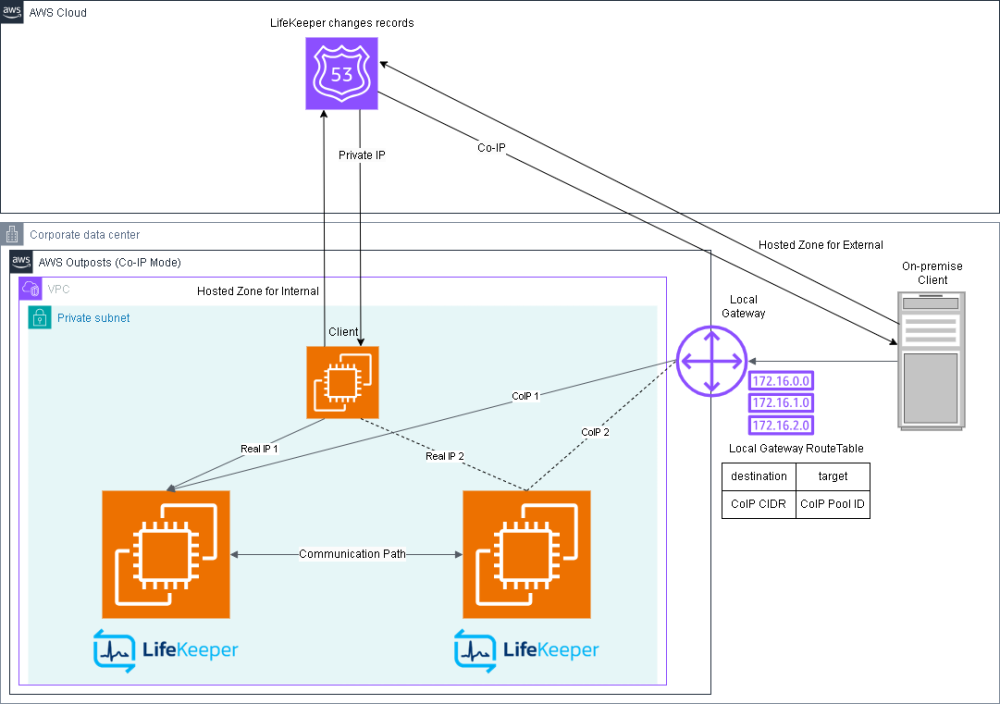
To communicate with the LifeKeeper cluster from external clients in CoIP mode, use RK for Route53.
Please make the OS recognize CoIP in order for RK for Route53 to rewrite the IP address corresponding to the A record of the Route53 Hosted Zone.
CoIP is not recognized by the OS even if it is assigned to an EC2 instance or ENI on the AWS console. Therefore, a private IP address equivalent to CoIP must be statically assigned on the OS. However, if a static IP address is assigned on the OS that is not assigned in the AWS console, it may cause problems with other communications using the corresponding NIC. Therefore, you should either assign a dedicated ENI that is not used for actual communications or create a dummy NIC, and then statically assign the CoIP to the NIC.
Red Hat OpenShift Virtualization
Available OpenShirft Virtualization Features
- Live Migration
- Snapshot
- Precautions when taking snapshots
- When using DataKeeper, snapshots must be taken in a manner that prevents data inconsistencies between the source and target nodes. To ensure this, stop all target nodes before taking snapshots, and make sure to take snapshots on all nodes at the same point in time.
- Precautions when restoring
- Stop all LifeKeeper cluster nodes before restoring.
- When restoring from a snapshot, the Persistent Volume Claim (PVC) is replaced by a different PVC. If a shared disk is attached, you need to manually specify the same PVC for all virtual machines except the first one restored, as their PVCs will either remain as the old PVC or be left unspecified.
- For Windows VMs, if a virtual Trusted Platform Module (vTPM) device is assigned, you must remove the vTPM device from the VM. In the OpenShift Virtualization Web console, go to the Configuration tab for the VM, set the boot mode to UEFI, and disable the vTPM setting from the YAML tab.
(This step is not necessary for OpenShift Virtualization v4.18 and later.)
- Precautions when taking snapshots
■ Before
spec:
..(snip)..
        devices:
          tpm:
            persistent: true
■ After
spec:
..(snip)..
        devices:
          tpm: {}
Configuration Requirements
Storage Requirements
The requirements for disks on which LifeKeeper is installed and those protected by LifeKeeper are as follows:
- Storage class is ocs-storagecluster-ceph-rbd-virtualization
- Type is Disk
- When protecting a shared disk with LifeKeeper, use the same Disk name on both nodes
- Interface is virtio
Network Requirements
- Networks used for LifeKeeper communication paths and IP resources must meet the following requirements.
- It is a Linux bridge network
- The network interface controller model is virtio
Client Requirements
- The intended clients are VMs and containers on the same OpenShift Virtualization.
Restrictions
- The following ARKs are not available for use.
- LB Health Check Kit
- ARKs for other virtualization platforms
- Recovery Kit for EC2
- Recovery Kit for Route 53
- Migration of a virtual machine with LifeKeeper installed between other virtualization platforms and OpenShift Virtualization is not supported.
- In the event of a failure related to OpenShift Data Foundation, LifeKeeper may not function as expected. We recommend implementing sufficient redundancy and preparing a solution other than LifeKeeper.
Post your comment on this topic.