


This section describes the configuration of the Recovery Kit for HULFT and the information you should consider before starting HULFT configuration.
Considerations for HULFT Configuration
HULFT allows you to install multiple HULFT environments on a single system. These environments are independent, and each HULFT environment is referred to as a HULFT instance in this document. A state where multiple HULFT instances are running on a single system is called a multi-instance configuration. Each HULFT instance has its own unique system environment settings file and virtual IP address.
The system environment settings file defines the HULFT system configuration. Each HULFT setting specified in this file determines the hostname, port number, process concurrency, and other parameters used by that instance.
A LifeKeeper HULFT resource hierarchy corresponds to a single HULFT instance.
Active/Passive Configuration and Active/Active Configuration
HULFT is software that supports a multi-instance configuration, allowing LifeKeeper to support both Active/Passive and Active/Active configurations. For example, consider a scenario where two servers are running one HULFT instance each, and one server fails. In this case, the HULFT instance on the failed server fails over to the other server, allowing the HULFT instance to continue running.
By starting HULFT instances on multiple servers, you can statically distribute the load. In addition, by adjusting the server priorities for failover, you can distribute the load even after a failover occurs.
Configuring HULFT with LifeKeeper
Before creating a HULFT resource hierarchy, you must ensure that the following HULFT configuration tasks have been completed.
- The hostname (myhostname) must be a virtual IP address protected by LifeKeeper, or the hostname corresponding to that virtual IP address.
However, when switching nodes using an FQDN rather than a virtual IP address (Recovery Kit for Route 53 or Recovery Kit for Load Balancer Health Check), specify the FQDN for the hostname (myhostname). - A separate HULPATH folder (a folder for storing HULFT environment settings files) must be created for each HULFT instance. Each HULFT resource hierarchy uniquely corresponds to a HULFT instance that contains its associated HULPATH folder. Note that the HULPATH folder must be identical on all servers configured for that HULFT resource hierarchy.
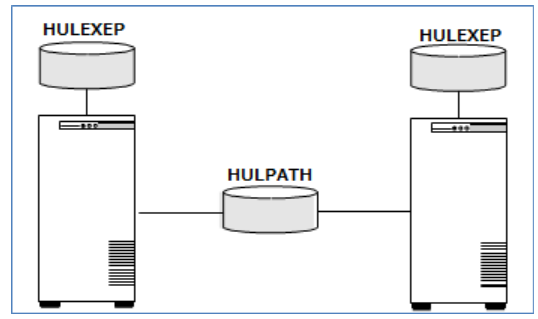
- Place the HULPATH folder on a shared volume, while placing the HULEXEP folder (the folder containing the executable modules) on a local file system.
- The Recovery Kit for HULFT controls and monitors the following HULFT Windows service processes that are protected:
- <HULEXEP path for each instance>\hulsrvc.exe
The following commands are also used to control and monitor the processes:
- <HULEXEP path for each instance>\utlsvcctl.exe
- <HULEXEP path for each instance>\utlalivecheck.exe
- <LKROOT>\Bin\ScQueryState.exe
Post your comment on this topic.