


Problem:
The issue causes bitmap writes to unexpectedly fail when any volume is removed (disk offline or partition deleted) from a system (PW-16197). This issue is limited to DataKeeper v8.10.2 and v8.11.0 (when used with LifeKeeper or Windows Server Failover Cluster). It has been corrected in DataKeeper Cluster Edition v10.0.0 and LifeKeeper v10.0.0 (includes DataKeeper v10.0.0).
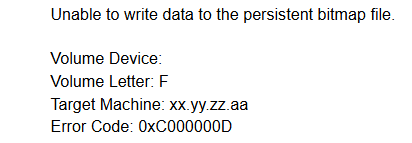
The symptoms of the issue present as Event ID 184 logged in the System Event Log by DataKeeper:
Solution:
Take the following steps immediately to check your systems and upgrade to v10.0.0. Note: if these steps are not taken to correct the issue, data corruption may occur.”
Step 1: Remediation for Event ID 184
- Take all protected resources Out of Service (LifeKeeper) or Offline (DKCE / WSFC) to prevent a switchover/failover of resources.
- Reboot all nodes.
- Ensure all mirrors are in a mirroring state upon reboot completion.
- Perform a full resync of mirrors sequentially to avoid overloading the target systems with the writes occurring simultaneously. Refer to the following documentation for the commands to force a full resync RESYNCMIRROR – DKCE LIVE – 8.10.2
- Once all of the full resyncs have started, bring resources back online/in service on the node where they previously were running.
- After the full resyncs are completed, continue to the next step.
Additional Note: Error 184 will not occur again unless the volumes are deleted after rebooting the system. The steps above will resolve the error 184.
Step 2: Verify Compatibility of Systems with v10.0.0
Using the Compatibility Utility:
- Run this utility on any system upgrading to DataKeeper v10.0.0
- Download the utility, checksum, and readme files from the following location, and follow the steps in the readme file to run the utility:
Index of /pickup/PW-17108-Upgrade-Compat-Utility - If the provided utility is not used, reference the following solution for manual steps: https://supportportal.us.sios.com/501PI00001wCs9BYAS
- After confirming your systems are compatible to upgrade to v10.0.0, proceed to step 3.
Step 3 – Perform the following upgrade procedures:
- Upgrade target system(s) to v10.0.0
- Reboot target system(s)
- After target system(s) are upgraded to v10.0.0 and rebooted, wait for mirrors to be in mirroring state
- Verify target system(s) are upgraded to v10.0.0 using: emcmd <system> getserviceinfo
- Perform full resync from the source system to all target systems
This full resync operation is required if either one or both of the following conditions occur:- Volume administration (adding or deleting volumes) occurs during ‘Step 3’.
- Event ID 184 has occurred.
- Switchover to the target system (in 1×1×1 select the target system in the same Datacenter or AZ as the current source system)
- Upgrade the previous source system to v10.0.0 and reboot
- After the previous source system is upgraded to v10.0.0 and rebooted, wait for mirrors to return to the mirroring state
- Verify previous source system is upgraded to v10.0.0 using: emcmd getserviceinfo
- Optional: Perform switchback to the original source system
Post your comment on this topic.