Use this feature to update a script that has been created to protect an application that has no associated SIOS Protection Suite Recovery Kit.
-
Right-click on the generic application resource and select Properties. Select the SIOS Protection Suite Generic Application Configuration tab.
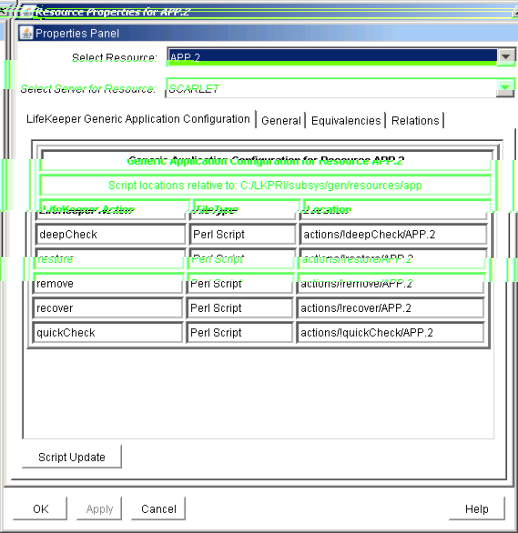
-
Select the Script Update button. Use the following table to complete the fields in the Generic Application Configuration procedure.
Field
Tips
Select the Action Script to Update
Select the SIOS Protection Suite action name for the resource that will be updated. Select:
- restore to update the script responsible for in-service operations.
- remove to update the script responsible for out-of-service operations.
- quickCheck to update the script responsible for monitoring the application.
- deepCheck to update the script that performs in-depth monitoring of the application.
- recover to update the script responsible for resource recover operations.
- delete to update the script that performs any additional actions required to remove the application from SIOS Protection Suite protection.
- extend to update the script responsible for additional actions required to prepare the application for protection with SIOS Protection Suite on the target server(s)
Full Path to New Script
Enter the pathname for the shell script or object program for the application.
-
The restore script is responsible for bringing a protected application resource in-service. (Required)
-
The remove script is responsible for bringing a protected application resource out-of-service. (Required)
-
The quickCheck script is responsible for monitoring a protected application resource after a failure event.
-
A copy of this script or program will be saved by SIOS Protection Suite in the resource hierarchy on the server.
-
There may be a short wait while SIOS Protection Suite validates the pathname to remove monitoring or recovery.
-
Do not specify a shell script or object program.
-
Valid characters allowed in the script pathname are letters, digits and the following special characters: - _ ! . /
-
The Basic File Statistics dialog displays old and new configuration information about the current script. Click Continue.
-
The Update All Systems dialog displays. Select Yes to update all systems in this cluster. Select No to only update the current system. If you choose No, you must separately update the corresponding script for the configuration on the backup servers. Click Next.
-
Click Done to complete.