Select a job in the Job Summary pane and right-click to choose Mirror Properties.
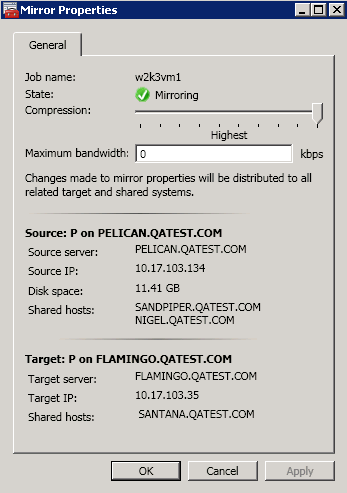
This dialog displays the following information about the job, source and target systems:
-
Job Name
-
State (current state of the job; for example, Active)
-
Source System
-
Server - name of source server
-
Source IP - IP address of source server
-
Disk Space - capacity of the source volume
-
Shared Hosts - other systems that have access to this volume via shared storage
-
-
Target System
-
Server - name of target server
-
Target IP - IP address of target server
-
You can modify the following settings through the Mirror Properties dialog:
-
Compression Level - specifies the compression level for the given mirror. The value can be set from lowest to highest. We recommend a level of "Medium low", but users should test several different settings to see what level works best in their specific environment. Compression is typically not required for LAN connections > 100 Mbps.
Note: Any changes made to the compression level setting are automatically propagated to all the systems listed in the Mirror Properties display.
-
Maximum Bandwidth - Specifies the maximum amount of network bandwidth (in kilobits per second) that a particular mirror is allowed to use. A value of 0 means unlimited.
Note: In a multi-target configuration where A is mirroring to B and C, the properties of the mirror between B and C cannot be set until B or C becomes the source.